


Dual Camera Front & Back
0.00.00 Reviews
App Specs
- Version
- 7.0
- Updated On
- License
- Free
- Downloads
- 10,000+
- Developer
- Boss Inc
- Categories
- Libraries & Demo
- Platform
- Android
Screenshots
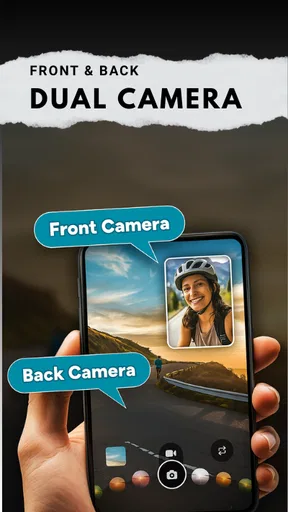
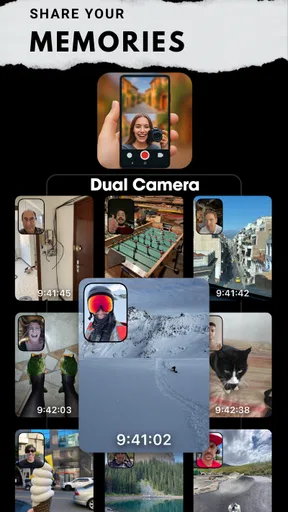
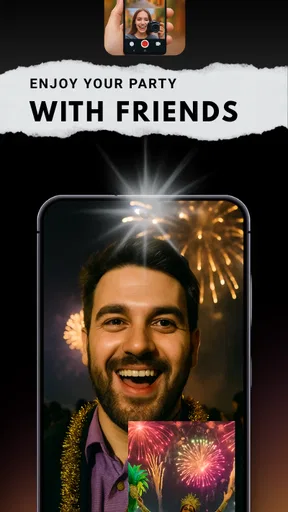
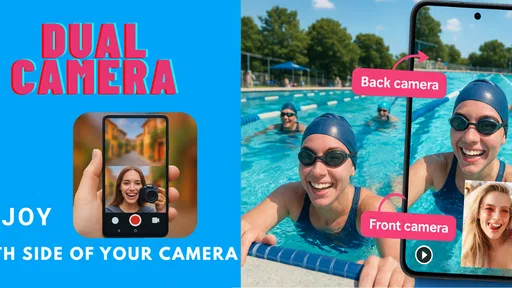
 Analysis by AppCompare
I like the idea behind Dual Camera Front & Back because it solves a small but familiar problem: a regular camera can show what I’m looking at, or it can show my reaction, but usually not both in the same capture. This app is aimed at bringing those two perspectives together. That makes it most interesting when the person holding the phone is part of the moment, rather than simply documenting something from the sidelines.
That focus also sets expectations. A dual-camera capture is less about producing a perfectly composed, polished image and more about keeping the scene and the person experiencing it together. I’d reach for it when that combination tells a fuller story, not as a replacement for every photo or video I take.
Who gets the most from a two-sided capture
The clearest audience is someone who often narrates what they are doing: a casual vlogger, a traveler sharing a first impression, or a friend recording a reaction while showing the reason for it. It can also suit a family moment where the event itself matters, but the person filming is part of the memory too. In those situations, one combined capture may communicate more than separate clips that need to be joined later.
There is a trade-off, though. A front-camera view can make a scene feel personal, but it also takes up space that could otherwise show the main subject. If I’m filming a concert, a detailed craft project, or anything where the view itself is the priority, a conventional single-camera recording is likely the better choice. I would not use a dual layout just because it is available; I’d use it when my reaction genuinely adds context.
A practical moment from start to finish
Imagine I’m walking through a weekend market and come across something unexpected. Before I start, I’d decide whether I want my face to be a small corner of the frame or an equally important half of it. That decision matters more than it first seems: a large selfie view can make my expression easy to read, while a smaller one leaves more room for the stalls, food, or street around me.
Then I’d hold the phone steady, check that both views include what I actually want to remember, and capture a short moment rather than recording everything. With two perspectives competing for attention, a little planning helps. I’d also try to keep the phone at a comfortable angle so the front view feels natural without pointing the rear camera away from the activity. The result should be a compact record of both the discovery and my response, rather than a long clip that makes viewers search for the interesting part.
That small workflow is useful for reactions, quick demonstrations, and travel impressions. It also points to a practical limitation: the phone’s position has to work for both cameras at once. If the subject is low on a table while I’m standing, or if I’m moving through a crowded space, finding an angle that serves both views may take a moment. I’d pause, frame the shot, and then begin instead of trying to fix an awkward composition afterward.
Worth Reading Before You Choose

EA SPORTS FC Mobile 26 Is a Bigger Football Game, but It Takes Time

Flipboard Shows What News Apps Must Do Beyond the Feed

Switching to Android Auto Means Rethinking Your Driving Routine

Google Calendar Makes a Crowded Week Easier to Manage

Ludo King Makes the Most of the Minutes Between Plans

Baby Panda World Brings Quick Play to Modern Phones, but Its Game Library Feels Busy
How it fits beside ordinary camera apps
A standard camera app is usually the simpler choice when I want the cleanest view of one subject, familiar controls, or a quick photo without deciding how two images should share the frame. A separate editing workflow can offer more control over combining footage, but it means capturing material independently and spending time assembling it. The appeal here is the combined perspective in one go: it is a more immediate way to show both the event and the person behind the phone.
That convenience is most valuable for spontaneous content. If I’m already thinking about how to tell a story, seeing both angles together can save a handoff between recording and editing. If I need precise framing, extensive post-production, or a carefully controlled result, a conventional camera and a dedicated editor may be more suitable. I see this as a creative option for specific moments, not a universal upgrade to the camera experience.
Small choices that improve the outcome
One useful habit is to make a test capture before an important moment. It gives me a chance to check whether the front view is distracting, whether the background is readable, and whether the combined framing feels balanced. I’d also think about light on both sides of the phone: a bright view in one direction does not guarantee that the other camera’s scene will be equally clear. Moving a step or turning slightly can sometimes help both perspectives without changing the point of the moment.
For a shareable clip, I’d keep the action simple and let the two views do different jobs. The rear camera can establish what is happening, while the front camera contributes expression or a brief explanation. If both views contain lots of movement or competing detail, the final capture may feel busy. Choosing one clear subject and one clear reaction makes the format easier to follow.
There is also a sensible privacy check before recording in public or around other people. A dual view can include more than I intend, especially when I’m focused on my own expression or the main scene. I’d look at the full composition, not only the camera I’m watching, and ask anyone nearby before making a moment part of a post. That is particularly worthwhile at family gatherings, where a spontaneous clip may include people who did not expect to be recorded.
For longer sessions, I’d plan around battery use rather than assuming a dual-camera recording will be as light on the phone as taking a quick picture. Keeping a charger available is practical if I expect to record for a while. Short, purposeful clips are a better fit than leaving both cameras running while waiting for something to happen; they also make the eventual result easier to review and share.
Getting Started with Dual Camera Magic
Jumping into Dual Camera Front & Back is super straightforward. Once you download and install it, you’re greeted with an intuitive interface that’s easy to navigate. I’m not the most tech-savvy person, but even I found it a breeze to use. The app opens up with a split-screen view, showing feeds from both cameras. This means you can record or capture photos from both angles at once—perfect for those moments when you want to capture your reaction and the scene in front of you.
Features That Stand Out
One of my favorite features is the ability to switch seamlessly between the two cameras. You can choose from various layouts, like side-by-side or picture-in-picture, to suit your creative vision. Plus, there’s a cool option to adjust the size of each camera view, which I found fantastic for emphasizing either the front or back camera.
Another fun addition is the in-app editing tools. You can tweak your images and videos right after capturing them—think filters, stickers, and text overlays. It’s like having a mini editing studio right in your pocket! So, if you’re someone who loves personalizing your content, this app has got you covered.
Performance and Usability
Now, let’s talk about performance. I tested the app on both Android and iOS devices, and it ran smoothly on both. There was no noticeable lag or crashes, which is always a relief. The video quality was impressive, maintaining clarity on both camera feeds. However, be aware that using both cameras can drain your battery pretty quickly. So, it might be a good idea to have a charger handy if you’re planning a long recording session.
Usability-wise, the app is incredibly user-friendly. The controls are intuitive, and the layout is clean—no clutter or confusing menus. I appreciate how the developers have focused on making the user experience as straightforward as possible.
Real-Life Applications
So, who exactly is this app for? Honestly, anyone who loves to capture moments creatively! Whether you’re a vlogger wanting to add a new dimension to your content, or just someone who loves taking unique selfies, this app opens up a world of possibilities. I’ve used it to capture family gatherings, showing both the fun activities and everyone’s reactions. It’s also great for travelers who want to document their adventures with a personal touch.
If you’re into social media, you’ll love how this app allows you to engage your audience in a more dynamic way. The dual-camera feature can add a layer of authenticity to your content, showing both your view and your emotions simultaneously.
What to expect before installing
In practical terms, this is a free app from Boss Inc in the Libraries & Demo category. It is marked for Everyone, has reached over ten thousand installs, and its average rating is currently zero. I would treat that rating cautiously: it gives a prospective user little community feedback to lean on, so the decision is better based on whether simultaneous front-and-back capture matches the way you want to shoot.
The app was released on August 3, 2025, and its current version is 7.0, with Android 8.0 as the minimum operating system. If you are choosing a device for this workflow, compatibility is only the first check. A phone’s camera behavior and available resources can affect how comfortable dual capture feels, so I’d try a brief recording before relying on it for an event that cannot be repeated.
Where the workflow can break down
The main friction is not learning a complicated editing process; it is getting two useful views at the same time. A phone can be easy to operate and still be awkward to position. When one camera faces a bright window and the other faces a dim room, or when the rear scene is moving while the front view needs to stay flattering, the split perspective can feel less balanced than expected. I’d choose a location and angle with both sides in mind rather than expecting the app to solve every lighting or framing problem.
There is a second trade-off after capture: a combined frame asks viewers to divide their attention. That can be lively for a reaction or a quick story, but it may be harder to watch than a single, focused shot. If the important detail is small, placing a selfie view beside it may make that detail even harder to see. For a tutorial, product close-up, or presentation where clarity matters more than personality, I’d record the main view first and add commentary separately if needed.
I’d also keep expectations grounded about editing. The listed tools make quick personalization possible, but filters, stickers, and text are not a substitute for a full editing workflow when timing, sound, sequencing, or detailed corrections matter. The strength is being able to make a capture feel more personal soon after taking it. The sensible handoff is to use another editor only when the finished piece needs more careful shaping than a quick social clip.
Choosing the right moment for it
For a user deciding whether to keep this app around, I’d ask one simple question: do you often wish your videos showed your reaction as well as what you saw? If the answer is yes, the dual-camera format offers a distinctive way to capture that relationship without separately filming two angles. If you mostly take landscapes, document small details, or want a clean image of someone else, the regular camera is likely to be quicker and less distracting.
It is also a better fit for short, intentional captures than for every occasion. I’d use it to record a first look at a place, a quick cooking reaction, a family game, or a brief explanation while showing the object I’m talking about. I’d skip it when I need to move quickly, preserve battery for the rest of the day, or avoid putting my face into a moment where it adds nothing. That choice keeps the format from becoming a gimmick and makes each dual view feel purposeful.
If you’re wondering whether you need special editing knowledge, the point of the app is to bring the two camera perspectives into one capture, and its immediate editing tools are aimed at simple finishing touches. If you’re wondering whether it is suitable for a long recording, I would be cautious because using both cameras can consume battery quickly. And if you want a polished project rather than a spontaneous, personal clip, a separate camera-and-editor workflow gives you more room to refine the result.
When both sides make the story better
So, who exactly is this app for? Honestly, anyone who loves to capture moments creatively! Whether you’re a vlogger wanting to add a new dimension to your content, or just someone who loves taking unique selfies, this app opens up a world of possibilities. I’ve used it to capture family gatherings, showing both the fun activities and everyone’s reactions. It’s also great for travelers who want to document their adventures with a personal touch.
If you’re into social media, you’ll love how this app allows you to engage your audience in a more dynamic way. The dual-camera feature can add a layer of authenticity to your content, showing both your view and your emotions simultaneously.
Wrapping It Up
To sum it up, Dual Camera Front & Back is a fantastic tool for anyone looking to enhance their photo and video capturing experience. It’s easy to use, packed with creative features, and performs well across devices. While it might be a bit of a battery hog, the ability to capture both sides of the action is well worth it. If you’re ready to take your content to the next level, give this app a shot—you won’t be disappointed!
My recommendation is enthusiastic but specific: I’d try it for a moment where seeing the person and the scene together is the whole point. I would not make it my default camera, and I would test the framing and battery impact before a longer outing. Used selectively, its two-perspective approach can make a small memory feel more complete; used automatically, it can crowd a shot that would be stronger with one clear view.
Pros
- Simultaneously captures from both cameras.
- User-friendly interface for easy navigation.
- High-quality output with minimal lag.
- Customizable settings for creative shots.
- Supports various social media sharing options.
Cons
- Limited editing tools within the app.
- High battery consumption during use.
- Occasional crashes on older devices.
- Ads can be intrusive in free version.
- Requires high storage space for videos.
FAQs for Dual Camera Front & Back
What is Dual Camera Front & Back and how does it work?
Dual Camera Front & Back is a photography app that allows you to simultaneously capture photos or videos using both the front and back cameras of your device. This app is perfect for creating unique content, such as reaction videos or dual-perspective photos. It seamlessly combines the two captures into one image or video, offering an innovative way to document moments.
Is the app compatible with all Android and iOS devices?
While Dual Camera Front & Back is designed for both Android and iOS platforms, its functionality may vary depending on your device's hardware capabilities. Some older or lower-end models might not support simultaneous camera use. It's advisable to check the app's compatibility with your specific model on the app store before downloading.
Does using both cameras simultaneously drain the battery quickly?
Using both cameras at the same time can be more demanding on your device's resources, which may lead to quicker battery consumption compared to using a single camera. It's recommended to have your device fully charged or to have a portable charger handy if you plan on extensive use of the app.
Are there any in-app purchases or subscriptions required?
Dual Camera Front & Back is free to download, but it may offer in-app purchases or premium features that enhance the user experience. These could include additional editing tools, filters, or ad-free usage. Users should review the pricing details on the app store to determine if these options suit their needs.
How is the photo and video quality when using both cameras?
The quality of photos and videos captured with Dual Camera Front & Back largely depends on your device's camera specifications. Modern smartphones with high-resolution cameras will produce better quality results. The app itself is optimized to maintain quality, but users should ensure adequate lighting and stability for the best outcome.


